
From a file reference to a file you can use
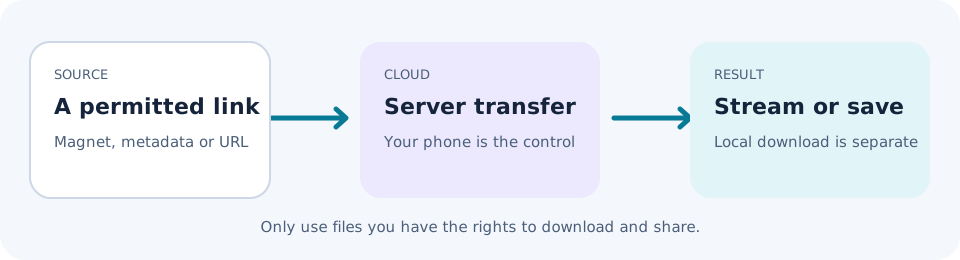
The website is your control panel. The transfer engine runs elsewhere. Here is what happens between adding a source and opening a finished download.
Before you add anything
Choose a file you own, are licensed to download, or can lawfully access as public-domain or open-source material. Check the publisher's permission and available file size. Your selected plan needs enough storage for the result.
Stage 1: Identify the source
A magnet link or info hash identifies torrent metadata. A .torrent file supplies metadata directly. Neither is the finished download. Paste the reference or upload the .torrent file through the signed-in interface.
You can also submit an HTTP(S) link to a permitted file. That uses the source web server rather than a peer-to-peer swarm. A web link does not bypass a publisher's access controls.
Stage 2: Let the cloud collect the data
For torrents, the service connects to peers and retrieves pieces of the file. Progress depends on the people sharing it. With no reachable seeders, a valid reference can still stall.
The cloud job does not require your iPhone to act as a torrent client or remain the transfer engine. Closing the browser is not the same as cancelling the job. Return to your account to check its state.
The approximately 20Gb/s bandwidth figure describes server infrastructure. It does not set a minimum or maximum speed for your individual job.
Stage 3: Review the completed files
Check names, extensions and sizes before opening anything. Play a supported video through the built-in player, or use the download controls to save a local copy. Save ordinary files in Files. Supported images and videos can go to Photos when that option appears in the share sheet.
A cloud transfer finishing does not put the files on your phone automatically. Streaming and downloading to Files both use your device's internet connection.
Stage 4: Decide what to keep or share
Use your storage allowance deliberately. Keep a separate copy of important files. Shareable links are for material you can lawfully distribute, and anyone receiving a working link may be able to open it. Do not put confidential material in a link you plan to circulate.
If progress stops
Check the source, available seeders and your remaining storage. For a private tracker, check that your paid plan and the tracker's rules permit the workflow. Never send a tracker passkey to a public forum or paste it into a support message.
If a completed file will not play, it may have an unsupported format or codec. Downloading it does not change that format. Contact support with a job reference if one is available, not your password or a sensitive magnet link.